
Moving Aliases by Dragging
Prerequisites: You must have the following group permissions:
- Site content item and asset item authoring permissions.
- Alias management permissions.
Drag and drop alias structures to move them within the
Site Tree.
To move an alias structure using the drag action:
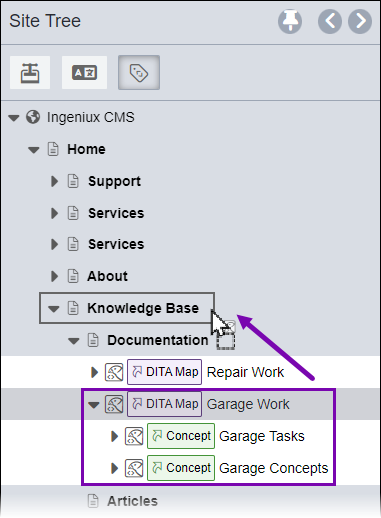
- Select and drag the top-level alias (the root) of the alias structure you want to move
in the Site Tree.NoteThe CMS maintains alias structures to mirror their corresponding DITA maps. This prevents moving individual aliases out of the structure—alias structures always move as single objects.
Task Troubleshooting: If you experience difficulty moving alias structures, consider these rules:
- You can only move complete alias structures starting from the top-level root alias. Child aliases cannot be moved independently because they reflect the corresponding DITA map structure.
- The CMS prevents duplicate alias structures from the same DITA asset to exist in
identical Site Tree locations. These alias structures cannot have
the same parent in the Site Tree.
For example, if the Site Tree contains two alias structures for getting-started.ditamap, the CMS prevents both structures from existing under the same parent page. Each alias structure must exist under separate parents.
- Version Notes: CMS 10.6.492CMS 10.6.492 displays only aliases marked to the publishing target in the Site Tree.
If the Site Tree does not display an alias structure, verify that the aliased DITA asset root is marked to the target selected in the Site Tree publishing target filter.
See CMS DITA Versioning Functionality for details about managing aliases with versioned DITA content.
Related Topics