
Publish Management
Publish Management in the Properties tab provides options to publish folders, pages, or components for a specified term, set advanced publishing options, and in CMS 10.5+, view publishing history.
Note the dialog UI differs between CMS 10.6 and CMS 10.0-10.5.
In CMS 10.6, click Publish Management from the Options list in the Properties dialog to access the settings.
In CMS 10.0-10.5, click the System Attributes tab in the Page Properties dialog to access Publishing settings. This dialog only provides publishing term settings and the Expand On Publish and Render on Publish checkbox options.
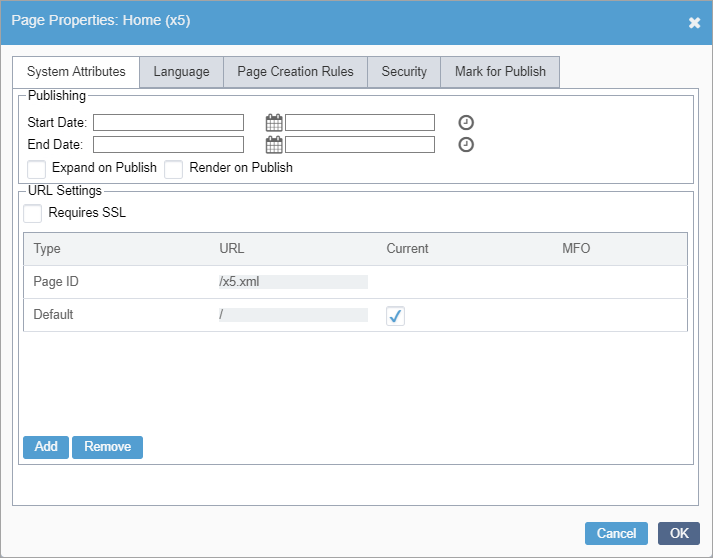
Publishing Term
To schedule when a content item publishes, set the Publishing Term in Publish Management properties. After the publishing term ends, the item reverts to unpublished.
To specify a Publishing Term for the content item, set the date and time fields.
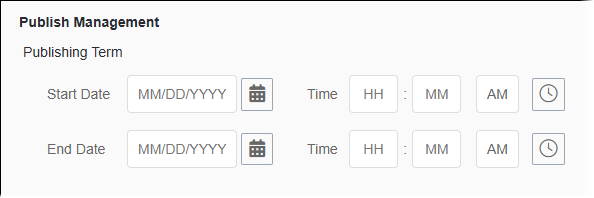
- Start Date and Time
- Use the date and time pickers to enter a Start Date and Time, indicating when the published page will display.
- End Date and Time
- Use the date and time pickers to enter an End Date and Time, indicating when the page will no longer display.
- The values for Start Date and End Date are based on the CMS users' time zone and are stored in the UTC time format. For processing, the DSS server uses these UTC entries for Start Date and End Date. These effectivity dates define only how long a published page stays available.
- After configuring date settings, the content item still requires publishing. You can
choose to run a manual publish or a scheduled publish. The Publishing
Term feature does not automatically run publishes or schedule pages for
publish; rather, the feature only controls the rendering of the page, given its
scheduled Start Date and End Date.
See Publishing System for details about publishing pages.
Advanced
The Advanced area provides options to expand and render content at publishing time and to serialize content on Check In.
Select or clear the Advanced checkbox options to suit your preferences. These checkboxes are cleared by default.
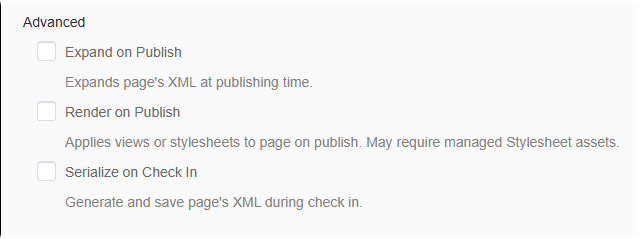
- Expand on Publish
- Select this checkbox to expand XML at publishing time.
This generates static content, without benefit of updates. This option may be useful to organizations that use an implementation other than DSS. By default, XML expands when there is a request for a page, which ensures that users get the latest content.
- Render on Publish
- Select this checkbox to render content at publishing time.ImportantSelect Expand on Publish to make the Render on Publish option available. This option may be useful to organizations that produce a flat HTML site or that use a development language other than .NET, such as ColdFusion. By default, the DSS renders content when there is a request for a page.
- Serialize on Check In
- Version Notes: CMS 10.1+In CMS 10.1+, select this checkbox to convert the XML object into a form that transports more efficiently.
Publishing History
View Publishing History to review when the item was last published to each publishing target.
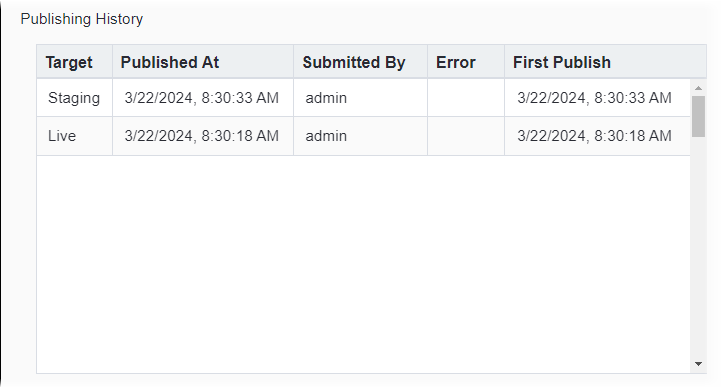
List entries provide the following details:
- Target
- Publishing target associated with the content item publish.
- Published At
- Time and date of the most recent content item publish.
- Submitted By
- User who ran the content item publish.
- Error
- Notes about errors that occurred during the content item publishing process.
- First Publish
- Time and date when the first publish ran on the content item. No publishes ran on this item before this date.