
Content Item Properties
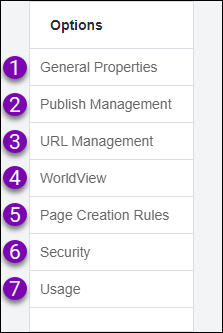
The CMS provides properties for pages, components and folders that users with permissions can view and manage. Access these properties either by navigating to the Properties tab or by clicking the Page Properties option from the Site Tree context menu. Properties include the following options.
–10.5, keep in mind the dialog UI is different. Differences include:
- The General Properties and tabs are inaccessible in this dialog.
- The System Attributes tab includes properties for Publish Management and URL Management.
- The Language tab in CMS 10.0–10.5 is equivalent to the WorldView option in CMS 10.6.
- The Mark for Publish tab is only available in CMS 10.0–10.5.

1. General Properties
Review general information about the item, including the ID, schema, checked-in status, assignment, and more.
2. Publish Management
Manage publishing term date and times, and view the publishing history of the content item or folder.
3. URL Management
Manage URL settings, including custom URL and SSL requirement settings.
4. WorldView
Manage WorldView language settings for the content item or folder.
5. Page Creation Rules
Add or remove page creation rules (PCRs) that apply to the content item or folder, and specify inheritance settings.
6. Security
Determine security access level permissions to the content item or folder for user groups.
7. Usage
Review a list of where the current item is referenced by other pages or components.