
Configuring Amazon AWS S3 Replication Targets
- Your environment meets the publishing prerequisites. See Publishing Prerequisites for details.
- You added the replication target. See Adding Replication Targets for details.
- You have at least one of the following:
- Valid values for the required fields from a subject matter expert (SME)
- Access to the Amazon AWS S3 service account
When you publish, the CMS can copy the published files to an Amazon S3 bucket. Administrators configure this replication in publishing targets by adding an Amazon AWS S3 replication target.
The CMS authenticates to AWS in one of three ways. Choose the authentication type that matches where your CMS server runs:
Authentication Types for Amazon AWS S3 Replication
| Authentication Type | Use When | Credentials Stored in the CMS |
|---|---|---|
| Keys | No Identity and Access Management (IAM) role option is available for your environment. | An IAM user's access key and secret key. |
| IAM Role Attachment | The CMS server runs on an Amazon Elastic Compute Cloud (Amazon EC2) instance. | An IAM role Amazon Resource Name (ARN) only. The CMS uses the IAM role attached to the EC2 instance and stores no keys. |
| IAM Roles Anywhere | The CMS server runs outside AWS (on-premises or in another cloud), and your organization has a private certificate authority (CA). | IAM Roles Anywhere ARNs, plus a certificate and private key that the CMS encrypts and stores. The CMS stores no AWS keys. |
Granting Required S3 Permissions
Grant the CMS permission to list the Amazon S3 bucket and to add and remove objects in the bucket for whichever authentication type you use. The CMS needs the following Amazon S3 actions:
| Action | Resource | Purpose |
|---|---|---|
s3:ListBucket | The bucket ARN:
arn:aws:s3:::bucket-name | List the bucket. |
s3:PutObject | The objects in the bucket:
arn:aws:s3:::bucket-name/* | Add objects to the bucket. |
s3:DeleteObject | The objects in the bucket:
arn:aws:s3:::bucket-name/* | Remove objects from the bucket. |
Task Troubleshooting: Access Denied when the CMS lists or writes to the bucket
The IAM role or IAM user is missing a permission, or the policy applies
s3:ListBucket to bucket/* instead of the bucket
ARN.
- Add any missing permissions from the table to the IAM role or IAM user.
- Apply
s3:ListBucketto the bucket ARN, not tobucket/*.
Choose Authentication Type to Prepare
The CMS authenticates to AWS in one of three ways. Choose the authentication type that matches where your CMS server runs.
Preparing AWS for Keys
No preparation needed. Skip this step and see Adding Amazon AWS S3 Replication Targets.
Preparing AWS for IAM Role Attachment
- The CMS server runs on an Amazon EC2 instance.
- The EC2 instance has an attached IAM role. This topic calls that role the instance role. See IAM Roles for Amazon EC2 for details.
- CMS 10.6 must be installed. See CMS Statistics to check your site version.
Create and configure the IAM roles that the CMS needs to replicate to Amazon S3 from an Amazon EC2 instance without stored keys. With IAM Role Attachment, the CMS uses the instance role's credentials to assume a second IAM role, the replication role, which has access to the bucket. Both roles must allow the instance role to assume the replication role.
Task Troubleshooting: Access Denied when the CMS assumes the role
The replication role's trust policy doesn't list the instance role, or the instance
role is missing the sts:AssumeRole permission.
- Add the instance role to the replication role's trust policy.
- Grant the instance role the
sts:AssumeRolepermission for the replication role.
The replication role's Maximum session duration is less than 12 hours. Set the replication role's Maximum session duration to 12 hours. See Update the maximum session duration for a role.
Preparing AWS for IAM Roles Anywhere
Prerequisites
- A private CA. Use AWS Private Certificate Authority or your own
CA. ImportantYou can't use certificates from public CAs, such as a website's Transport Layer Security (TLS) certificate, with IAM Roles Anywhere.
- A certificate that the CA issued to the CMS server, and the matching private key, both in Privacy-Enhanced Mail (PEM) format.
- CMS 10.6 must be installed. See CMS Statistics to check your site version.
Set up a trust anchor, an IAM role, and a profile so that the CMS can replicate to Amazon S3 from a server that runs outside AWS. With IAM Roles Anywhere, the CMS presents the server's certificate to AWS in exchange for temporary credentials for an IAM role. The CMS includes the required credential helper, so you don't need to install the credential helper.
Task Troubleshooting: The CMS can't obtain credentials
One of the following causes applies:
- The CA in the trust anchor didn't issue the certificate.
- The certificate expired.
- The trust anchor ARN, profile ARN, or role ARN is incorrect.
- The
aws:SourceArnvalue in the role's trust policy doesn't match the trust anchor ARN.
- Verify that the CA in the trust anchor issued the certificate and that the certificate is current.
- Verify the trust anchor ARN, profile ARN, and role ARN in the replication target.
- Verify that
aws:SourceArnin the role's trust policy matches the trust anchor ARN.
Adding Amazon AWS S3 Replication Targets
- If you use the IAM Role Attachment or IAM Roles Anywhere authentication type, the required AWS resources exist. See Preparing AWS for IAM Role Attachment or Preparing AWS for IAM Roles Anywhere.
- You added the replication target. See Adding Replication Targets for details.
- Enter the credentials for the selected authentication type:
Field Description Access Key A 20-character alphanumeric string, such as AKIAIOSFODNN7EXAMPLESecret Key A 40-character string, such as wJalrXUtnFEMI/K7MDENG/bPxRfiCYEXAMPLEK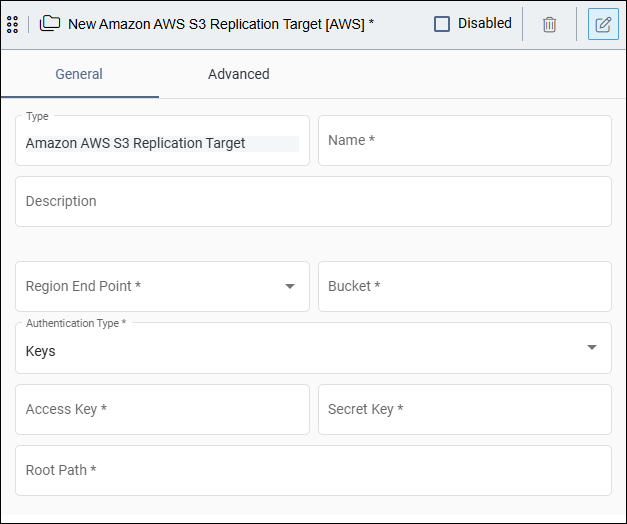
Field Description IAM Role ARN The replication role's ARN, such as arn:aws:iam::111122223333:role/IngeniuxS3Replication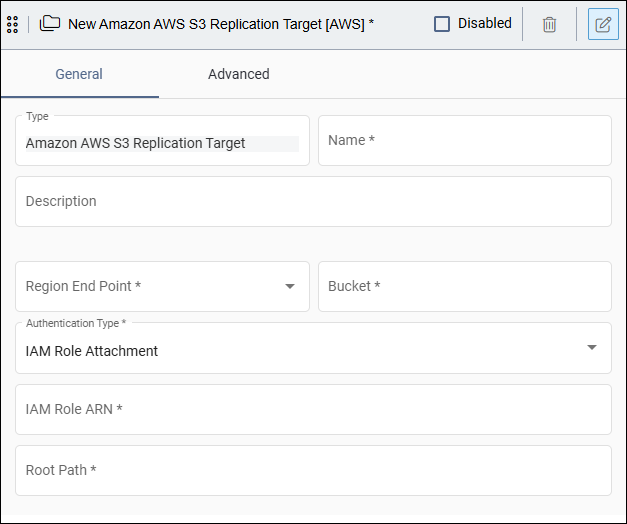 Version Notes: CMS 10.6This authentication type is only available in CMS 10.6.
Field Description IAM Role ARN The replication role's ARN, such as arn:aws:iam::111122223333:role/IngeniuxS3ReplicationIAM Role Anywhere Trust Anchor ARN The trust anchor ARN IAM Role Anywhere Profile ARN The profile ARN IAM Role Anywhere Certificate Click Upload, then select the CMS server's certificate file in PEM format (.pem or .txt). IAM Role Anywhere Private Key Click Upload, then select the matching private key file in PEM format (.pem or .txt). The CMS encrypts and stores the uploaded certificate and private key.
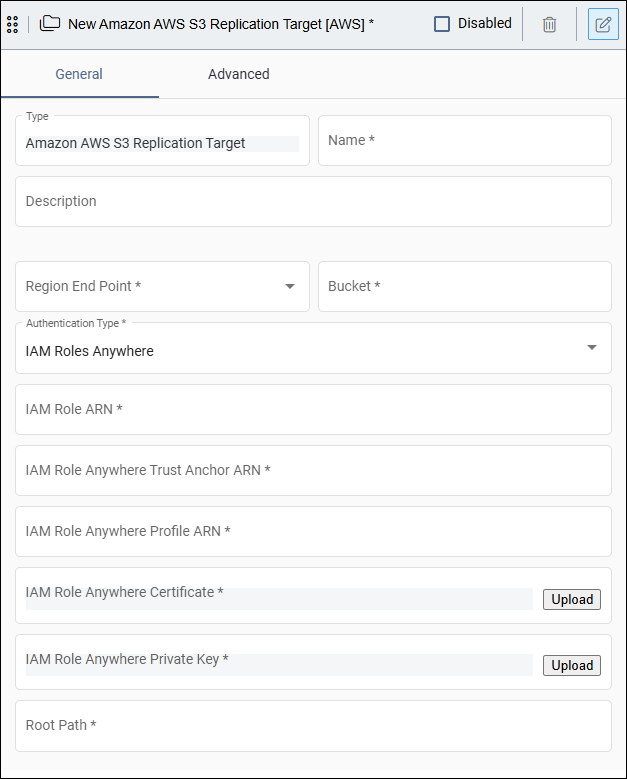 Version Notes: CMS 10.6This authentication type is only available in CMS 10.6.
Next Steps: To configure exempt locations, additional locations, cleanup exclusions, and custom commands for the replication target, see Advanced Settings.