
DITA Alias Icons and Types
The Site Tree pane interface displays alias icons and tagging to identify aliases, their associated DITA content type, their content statuses, and other information.
DITA Aliases in the Site Tree
The DITA content icon  displays for each alias item within the Site
Tree. DITA items in the Assets Tree
also display this icon. Similar to icons for content and asset items, the alias icon changes
color (blue) when the DITA content associated with the alias is checked out.
displays for each alias item within the Site
Tree. DITA items in the Assets Tree
also display this icon. Similar to icons for content and asset items, the alias icon changes
color (blue) when the DITA content associated with the alias is checked out.
Users can hover over individual aliases in the Site Tree to review the following details:
| Data Type | Description |
|---|---|
| Id | The ID of the alias item. Each alias ID is composed of the letters da and a forward-slash, followed by a number (e.g., da/07). |
| Asset Name | The file name of the DITA content associated with the alias. |
| Schema | The asset schema of the DITA content associated with the alias. |
| Assigned To | The user or group assigned to the DITA content associated with the alias. |
Aliased Map Group Elements
If aliased DITA maps contain group domain elements such as <topicgroup>, <topichead>, or <topicset>, the CMS
generates aliases for these elements in the Site
Tree. Rather than the DITA content icon, the container icon  displays next to aliases that represent these elements.
Aliases of DITA map group elements associate with the containing DITA map. The aliases serve only as a visual representation to indicate where these group elements reside within the DITA map structure and how they influence the map hierarchy. Access the aliased DITA map to view and edit these elements.
See the OASIS DITA 1.3 Standard Map Group Elements for specification details.
Document Type Information
Users can display or hide the DITA type tagging for aliases by selecting the Toggle Document Type Information button in the Site Tree.
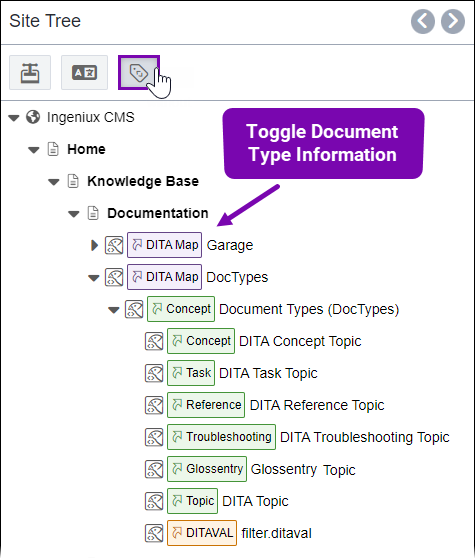
These tags indicate the document type associated with the aliased DITA content. Each tag specifies whether the alias associates with a DITA map, DITA topic, DITAVAL, or other. If the alias associates with a DITA topic, then the tag specifies whether the topic type is a concept, task, reference, or other.
Alias Search Results
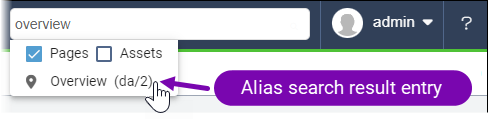
Users can search for aliases in the main CMS search or when they want to search for an alias to add as a link in site pages or components. If users want to filter search results, remember that aliases are included under the site page filter. Alias search entries display with the pin icon.
Related Topics