
Creating Aliases by Dragging
Create alias structures by dragging DITA assets to the Site Tree.
- Choose one of the following steps:
- Drag the DITA asset from the Assets main pane.
- Click the DITA asset you want for the alias structure root.
The DITA asset displays in the main pane.
- Click the Site Tree icon in the utility bar.
The Site Tree utility pane displays.
- Hover over the alias drag handle
 next to the DITA asset name in the main pane.
Instructions display in the tooltip:
Drag under a page node in the Site Tree to create an alias for this asset.
- Drag the handle to the page, component, or folder that will serve as the parent
for the new alias structure in the Site Tree.
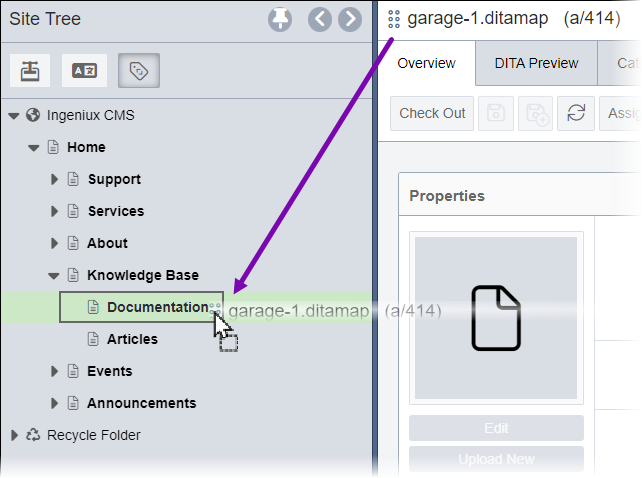
- Click the DITA asset you want for the alias structure root.
- Drag the DITA asset from the Asset Tree pane.
- Select the Site Tree icon in the utility bar, then select
the Pin (thumbtack) icon
 in the top-right corner of the Site Tree pane.
The pin keeps Site Tree pane open while you work in the Assets Manager.
- Select the Asset Tree icon in the utility bar.
The Asset Tree displays next to the pinned Site Tree .
- Navigate to the DITA asset you want for the alias structure root.
- Drag the DITA asset from the Asset Tree to the
Site Tree page, component, or folder that will serve as the
parent for the alias structure.TipIn the Site interface, you can alternatively drag the DITA asset from the pinned the Asset Tree to the Site Tree.
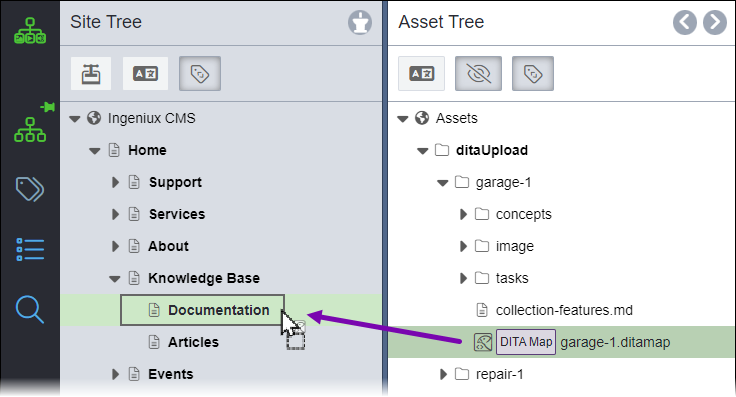
- Select the Site Tree icon in the utility bar, then select
the Pin (thumbtack) icon
The Creating Alias confirmation dialog displays, asking you to verify the alias structure creation for the selected DITA asset under the chosen parent content item. - Drag the DITA asset from the Assets main pane.
- Verify the DITA asset and Site Tree location are correct, then
click Create.The new alias structure displays under the parent content item or folder in the Site Tree.
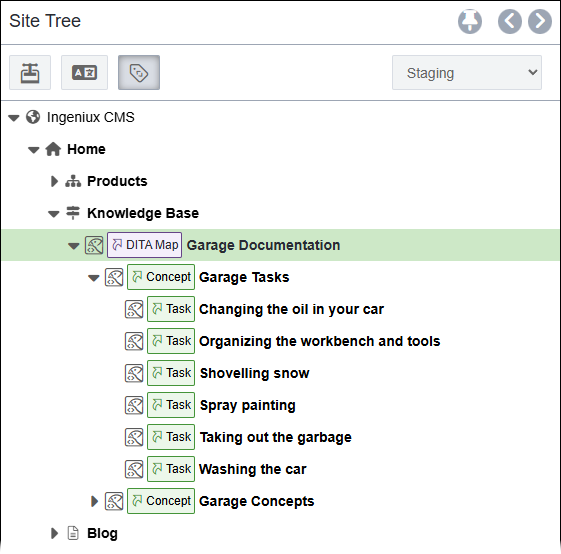
Task Troubleshooting:
If the Site Tree does not display the new alias structure, verify that the aliased DITA asset root is marked to the target selected in the Site Tree publishing target filter.
See CMS DITA Versioning Functionality for details about managing aliases with versioned DITA content.